
Sovren FAQ.
Straight answers about Sovren, the automated NQ and MNQ opening range breakout strategy for NinjaTrader 8: what it trades, when, how to set it up, what it does not do, and what it costs.
Updated
About Sovren
What is Sovren?
Sovren is automated trading software for NinjaTrader 8. It runs one rules-based opening range breakout strategy on NQ and MNQ futures at the 9:30 AM ET New York open, places and manages its own orders through your NinjaTrader account, and is done for the day by 11:00 AM ET.
Is Sovren Trading the same as the Sovren resume software?
No. Sovren Trading (sovrentrading.com) makes Sovren, automated NQ and MNQ futures trading software for NinjaTrader 8. It has no connection to the Sovren resume and CV parsing software.
What does Sovren trade?
Nasdaq-100 index futures: the E-mini Nasdaq-100 (NQ) or the Micro E-mini Nasdaq-100 (MNQ), which is one tenth of the dollar size of NQ. You pick the instrument and 1 to 10 contracts per account. More on running it on MNQ.
Which trading platform does it run on?
NinjaTrader 8 desktop, on Windows. It runs as a NinjaScript strategy on a 1-minute NQ or MNQ chart and sends orders through your own NinjaTrader connection to your broker or prop firm account. There is no bridge, copier or third-party execution platform. It does not run on other platforms.
When does it trade?
Every New York cash session. It builds the opening range from 9:30 to 9:35 AM ET and can enter from 9:35 to 11:00 AM ET. Many sessions produce no qualifying signal, and on those days it does not trade. It takes no new trades after the 22nd of each month, sits out verified high-impact news days by default, and holds nothing overnight.
How it trades
How does the opening range breakout logic work?
The first five 1-minute bars after the 9:30 AM ET open set the range high and low. From 9:35 AM ET Sovren waits for a 1-minute bar that closes beyond the range and also passes body-size, wick and direction rules, so small drifts across the line are ignored. When a bar qualifies it places a limit order at that bar’s close with a fixed profit target. The full session walkthrough covers each step.
How are trades closed and risk limited?
Every trade has a fixed profit target and a protective exit that closes the position at market if price moves a set distance against it. One losing trade ends the day. Trades per day default to 2 (adjustable 1 to 3), a volatility filter skips unusually wide opens, and anything still open is closed before the daily futures session ends. The protective exit is managed by the strategy, so NinjaTrader must stay running and connected while a trade is open, and fast markets can fill worse than the trigger price.
Do I have to watch the market?
No. Once it is enabled on the chart before 9:30 AM ET it handles entries and exits on its own, and a status badge on the chart shows what it is doing. Checking your account regularly is still recommended. If you enable it after 9:30 it sits out that session rather than trying to catch up.
Setup
What do I need to run Sovren?
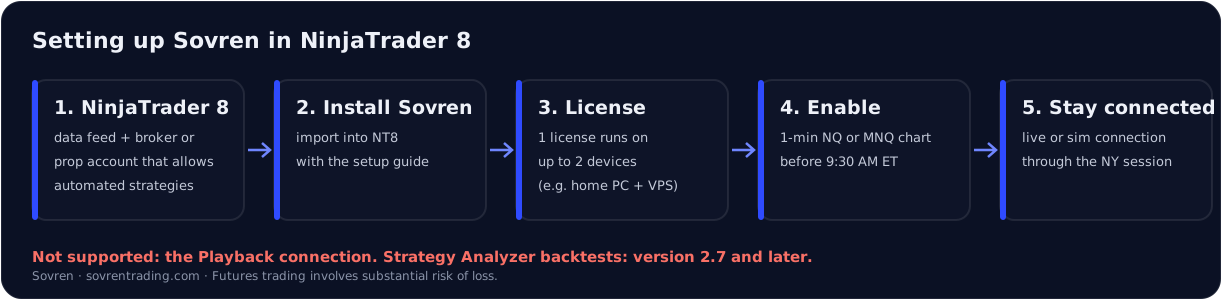
NinjaTrader 8 with a data feed and a connected broker or prop firm account, a 1-minute NQ or MNQ chart on the default CME US Index Futures ETH trading hours, and a computer or VPS that stays on and connected through the New York morning.
How do I set it up?
Four steps, about ten minutes: (1) import the Sovren file into NinjaTrader 8 and restart; (2) add Sovren to a 1-minute NQ or MNQ chart and pick your account and contracts; (3) paste the activation key from your sovrentrading.com account page; (4) enable it before 9:30 AM ET. To update, remove the old Sovren assembly in NinjaTrader and import the new version.
How many computers can I run it on?
Each license runs on up to 2 devices, for example a home PC and a VPS. Your account page shows how many devices are in use. If you need to swap a device, email support@sovrentrading.com.
Can I backtest Sovren in Strategy Analyzer or on the Playback connection?
Yes, in the Strategy Analyzer. Sovren 2.7 and later run in NinjaTrader’s Strategy Analyzer, so you can backtest it yourself on your own historical data. Backtest results are hypothetical and can differ from live trading. Sovren does not trade on the Playback (market replay) connection.
Prop firms
Can I use Sovren with a prop firm?
Yes, where your firm allows automated strategies on NinjaTrader 8; confirm your firm’s automation and news rules first. Sovren is built for end-of-day (EOD) drawdown accounts. Intraday trailing drawdown accounts are not recommended, because the limit follows open profit in real time. Firm-specific notes: Topstep, MyFundedFutures, Tradeify, Lucid Trading and FundedNext.
Can I run it on more than one account?
Yes, subject to each broker’s and prop firm’s rules on automated and multi-account trading. Each account runs the same rules, and you choose the contract size per account. See running Sovren on multiple accounts.
Pricing
How much does Sovren cost?
$79.99 per month, billed monthly, cancel any time, or $699 per year. New customers can use code FIRST25 for 25% off the first month ($59.99, then $79.99 per month). A partner code takes the monthly plan to $69.99 per month instead; one code per checkout. Payment is by card through Stripe. There is no free trial.
What is the refund policy?
New subscribers can ask for a refund of their first payment within 14 days; each request is reviewed. Renewals are non-refundable. You can cancel from your account and keep access until the end of the period you paid for. See the terms.
Results and risk
Are Sovren’s results live or backtested?
The headline results are live trading from January 2026 to the present on 2 NQ contracts, based on NinjaTrader account statements. A six-year backtest is shown separately and labelled hypothetical. The results page and disclosures explain the methodology, commissions and limitations. Past performance does not guarantee future results, and live results can differ because of slippage, latency, data differences and connection issues.
Is Sovren financial advice?
No. Sovren is software that executes a fixed set of rules. It is not investment advice and does not know your financial situation. Futures trading involves substantial risk of loss and is not suitable for every investor; only trade money you can afford to lose.
How does Sovren compare with other NinjaTrader strategies?
Sovren does one thing: a single NQ/MNQ opening range breakout in the first 90 minutes of the New York session, with a daily loss limit of one trade. Side-by-side pages: Sovren vs Hunters Algo and Sovren vs Right Line Trading. For how ready-made bots, signal bridges and building your own compare, see automated NQ strategies compared.
Support
How do I get help?
Members can book a 1-on-1 Zoom call with our support team from their dashboard. You can also email support@sovrentrading.com. The setup guide and video walk through every click of the install.
Futures trading involves substantial risk of loss and is not suitable for every investor. Past performance does not guarantee future results. Sovren is software, not investment advice. Disclosures.